Features
Everything Mooring does
Every tab in Mooring is a real terminal, drawn by libghostty and kept running by tmux. Around it sits everything you need to keep Claude’s work organised. Start with the six things most people come for, then see the rest below.

- WorkspaceKeep your code, your Claude sessions and your tasks in one window
- VoiceCapture ideas without stopping Claude
- UsageSee how fast you’re using your Claude plan
- Plan limitsStop cleanly at your plan limit, and carry on when it resets
- ThemesMake Mooring look the way you want
- SetupGet started in a few minutes
And more
More that Mooring does
Keep every session running.
Every tab is a real terminal, running a shell or Claude Code. Your sessions keep going when you quit Mooring, put your Mac to sleep or restart it, and Mooring reconnects each one when you come back.
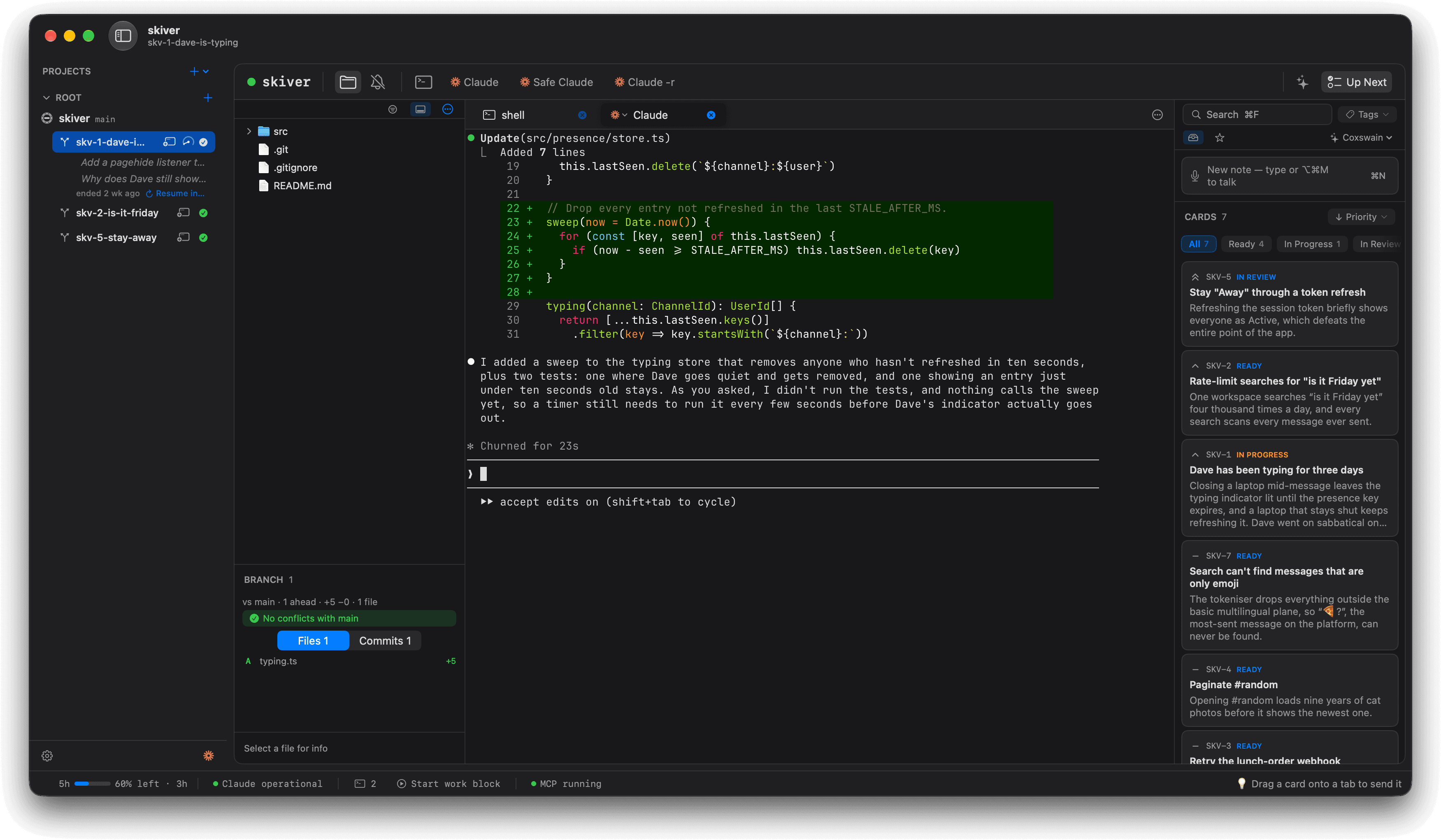
Give each task its own branch.
Every task gets a permanent key, like MOOR-42. Send a task to a new worktree and Mooring names the branch to match. Marks such as Ready for merge show where each branch is, and clear when it merges.
Review a branch before you merge.
Browse files with their git status as you go. Branch review shows what a worktree adds, file by file and commit by commit, with a clear answer on whether it’s ready to merge.
Know when Claude needs you.
A dot on the tab and a notification take you straight to any session that’s waiting for you. Optional Claude Code hooks do the same for projects you’re not looking at.
Let Claude use Mooring too.
Restart a stuck session without losing your place. Mooring’s built-in MCP server lets Claude list and restart sessions, read git status, manage worktrees and update tasks by key.
# tools a Claude pane can call
list_sessions · restart_session
git_status · remove_worktree
update_backlog_item MOOR-42
Read along as Claude works.
The Conversation window ⌥⌘Yshows the selected tab’s conversation next to the terminal, nicely formatted. It follows you from tab to tab and shows whether Claude is thinking, replying or waiting for you.
Find anything you asked Claude.
Each row in the sidebar shows what you last asked Claude. Click one to read your question and the reply side by side, or open the Sessions window ⇧⌘Y to see every Claude session Mooring has seen.
Set up agents your way.
Each agent button is a launch profile, so you choose the model, the flags or a custom command. Claude runs straight through, and Safe Claude asks before it acts.
Quit without losing anything.
When you quit, Mooring asks whether to keep your sessions running or close them. Closing gives each Claude session time to save its conversation first, and Mooring can remember your answer.
Reuse your favourite prompts.
Save the prompts you use often as favourites. Press ⇧⌘K, pick one, and it goes straight to the selected tab.
Undo any change to a task.
⌘Z undoes changes to tasks, including edits Claude and Coxswain make. Archive a task by mistake and one keystroke brings it back.
Pace your day with Work Hours.
Work Hours can remind you to take breaks, warn you at the end of the day and time-box blocks of work. Turn on only what helps.
Learn as you go.
Help ▸ Tips is a searchable library of short how-tos, and Mooring shows a new tip at startup so you don’t miss new features.
Made for the Mac.
Mooring is notarized by Apple and updates itself. It runs without the sandbox limits that would get in tmux’s way, and its on-device AI stays on your Mac.
On the keyboard
Do it all from the keyboard
New tabs, panes, dictation, Up Next and the actions on each task all have shortcuts, and ⇧⌘K opens your saved favourites.
See the full list in the keyboard-shortcuts reference.

Free · Apple silicon · macOS 26+
Ready to get more done with Claude Code?
Mooring is free to download. It’s notarized by Apple, updates itself, and its on-device AI stays on your Mac.